Which keyboard app does your Android phone use?
On Android, the keyboard is an app, and the steps depend on which one you use. Many Android phones come with Gboard, Google's keyboard. Samsung Galaxy phones come with Samsung Keyboard. If you are not sure, open any text field and look at the keyboard: Gboard's help page refers to a Settings button at the top of the keyboard; Samsung Keyboard has its own settings in the phone's Settings app.
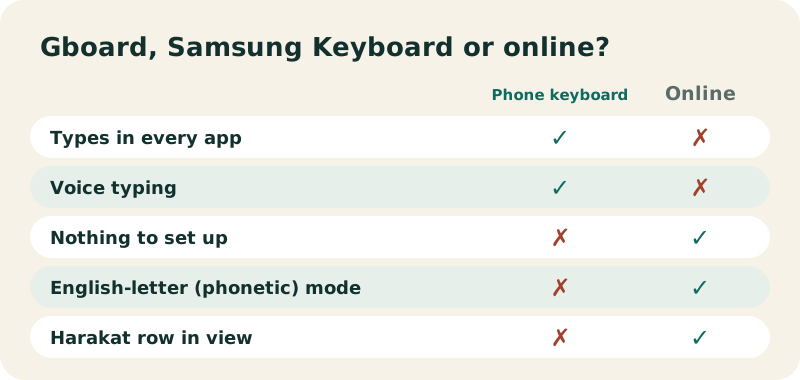
Both keyboards include Arabic for free. Changing the keyboard language does not change your phone's language: Google says so explicitly for Gboard, and Samsung Australia states the same for Samsung Keyboard.
How do you add Arabic to Gboard?
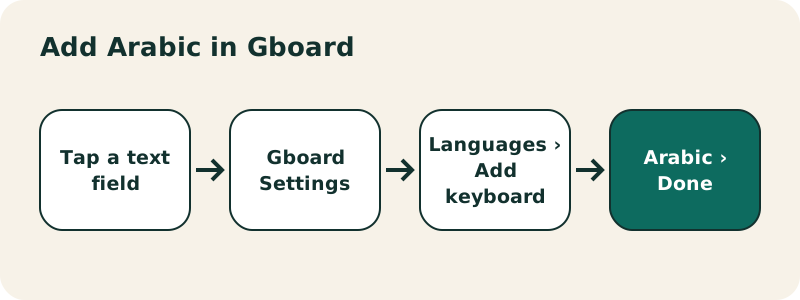
- Open any app you can type in, like Gmail or Keep, and tap a text field.
- At the top of the keyboard, tap Settings.
- Tap Languages › Add keyboard.
- Pick Arabic, then the layout you want to use.
- Tap Done.
You can reach the same screen from the Settings app: System › Keyboard › On-screen keyboard › Gboard › Languages. Google notes that some of these steps work only on Android 7.0 and up.
“When you change languages with Gboard, your Android device's language settings aren't affected.”
How do you switch between English and Arabic in Gboard?
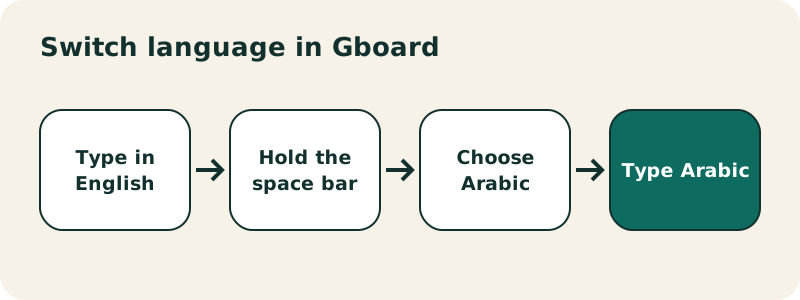
- Touch and hold the space bar, then choose Arabic.
- Or turn on the language switch key (a globe): touch and hold the comma, drag to Settings, then Preferences › Show language switch key. Google adds that if this option is greyed out, you need to turn off Show emoji switch key first.
How do you add Arabic on a Samsung Galaxy?
- Open Settings, tap General management, then Samsung Keyboard settings.
- Tap Languages and types, then Manage input languages.
- Turn on Arabic, or download it first from the list of available languages.
Samsung's US support page explains how to switch afterwards:
“To use the new language, navigate to the Samsung Keyboard, and then tap the language icon (it looks like a globe). Tap the language icon again to switch between the languages.”
Menu names can differ slightly between One UI versions. If you do not see General management, search for "Samsung Keyboard" in the Settings search bar.
Which Arabic layout should you pick?
After you pick Arabic, Gboard asks you to "Pick the layout you want to use". The choices depend on the app version, so we will not list them here. If you want to type Arabic letters directly, choose the plain Arabic layout. If you would rather type in Latin letters, our English to Arabic keyboard does that in the browser. You can turn several layouts on and switch between them.
How do you type harakat on Android?
On phone keyboards, vowel marks are not on the main layer; they usually appear on secondary keys or with a long press, and the place depends on the app and its version. Google and Samsung do not publish a key-by-key list, so explore the keys near alif and the punctuation keys. For a fully vowelled phrase, type it on the Arabic keyboard with harakat in Chrome and paste it.
Can you use voice typing in Arabic?
Often yes, but Google warns that talk-to-text does not work with all languages. With Arabic active in Gboard, tap the microphone and speak. If dictation does not work, your Arabic variety may not be supported. Dictated text normally comes without harakat.
Can you type Arabic on Android without changing the keyboard?
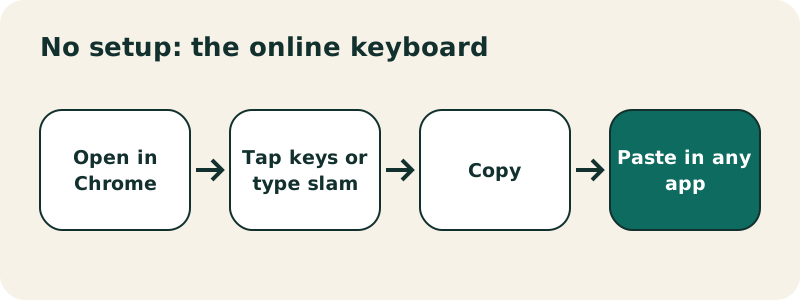
Yes. Open the online Arabic keyboard in Chrome. Tap the on-screen keys, and tick "use only this keyboard" so your phone's keyboard stays hidden. Or switch to Phonetic mode and type with your usual English keyboard: slam gives سلام. Copy the result into WhatsApp, Instagram or any app. Nothing is installed and nothing in your settings changes.
What if Arabic is missing or does not switch?
- Arabic is not in the list: update your keyboard app from the Play Store, then look again.
- Space bar does not switch: only one language is enabled in Gboard, or another keyboard app is active. Check Settings › System › Keyboard › On-screen keyboard.
- Arabic letters appear separated: the app does not support Arabic shaping; paste the text into another app.
- Text sits on the left: start the line with an Arabic word; most apps then align it to the right.
To learn the letters themselves, see the Arabic alphabet. On a computer, read type Arabic on Windows; on an iPhone, type Arabic on iPhone.
Frequently asked questions
How do I add Arabic to my Android keyboard?
In Gboard: open any text field, tap Settings at the top of the keyboard, then Languages › Add keyboard › Arabic › Done.
How do I switch between English and Arabic on Android?
In Gboard, touch and hold the space bar. On Samsung Keyboard, tap the globe icon.
Will my phone switch to Arabic?
No. Google states that changing Gboard languages does not affect your device language settings.
How do I add Arabic on a Samsung phone?
Settings › General management › Samsung Keyboard settings › Languages and types › Manage input languages, then turn on Arabic.
Is the Arabic keyboard free on Android?
Yes. Gboard and Samsung Keyboard include Arabic at no cost.
Can I type Arabic with English letters on Android?
Use our English to Arabic keyboard in Chrome, or check whether your keyboard app offers a Latin-letter Arabic layout.
Does Arabic voice typing work?
In many cases, but Google notes that talk-to-text does not work with every language.
Why can't I see the language switch key?
Turn it on in Gboard Settings › Preferences › Show language switch key. If it is greyed out, turn off Show emoji switch key.
Related pages
Arabic keyboard — Free online Arabic keyboard: type Arabic with your QWERTY keyboard or by tapping the keys, then copy the text anywhere.
See also:
Sources
- Type in a different language (Gboard Help, Android) — Google
- Adjust keyboard settings on your Galaxy phone or tablet — Samsung
- Arabic alphabet — Wikipedia