How does this Arabic typing test work?
The Arabic typing test above shows a text in Arabic, right to left, and asks you to copy it. Each character changes color as you type it: dark green when it is right, red when it is wrong. The next character is underlined, and the key that types it lights up on the small keyboard at the bottom, with the finger that should press it.
You do not need to install anything. If your computer has no Arabic layout, the test reads the position of each key you press and converts it to the Arabic letter at that position, exactly like our online Arabic keyboard: F gives ب, H gives ا. If Arabic is already active in Windows, macOS or Linux, the test detects it on the first key and lets your system type.
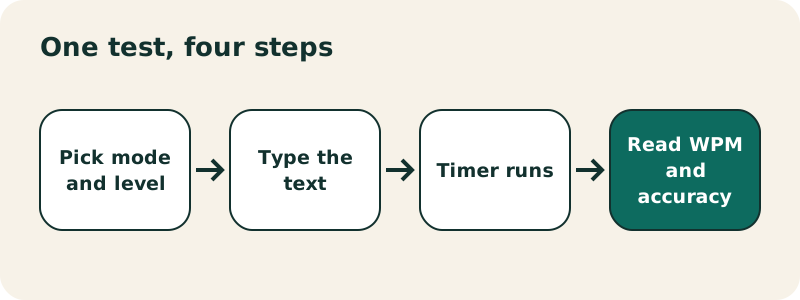
What the test does not do
- There is no ranking, account or server: your text and results never leave your browser.
- Pasting is blocked in the input box, so the result reflects your real typing.
- Texts are written without harakat. To practise vowel marks, use the Arabic keyboard with harakat.
Which mode and level should you choose?
| Option | What you type | Good for |
|---|---|---|
| Test, 1 min | a text at the chosen level for 60 seconds | a quick daily measure |
| Test, 2 min | the same over 120 seconds | a steadier result than one minute |
| Test, 5 min | a long, endless text | endurance and consistency |
| Level: Letters | isolated letters | learning where each key is |
| Level: Words | common everyday words | the usual speed measure |
| Level: Sentences | short sentences with hamza and ؟ | real typing, with Shift |
| Lessons 1 to 6 | one keyboard row at a time | learning to type without looking |
The words and sentences were written for this site: everyday vocabulary (family, home, food, weather, school), with no religious or political content. Sentences include hamza letters such as أ (Shift+H) and the Arabic question mark ؟ (Shift+/ on QWERTY), so you use Shift as in real texts. Press Esc to restart the same text; New text picks another one.
What is the home row of the Arabic keyboard?
The home row is the middle row, where your fingers rest between keystrokes. On the Arabic (101) layout it holds, from left to right, ش س ي ب ل ا ت ن م ك ط: the QWERTY keys A S D F G H J K L ; '.
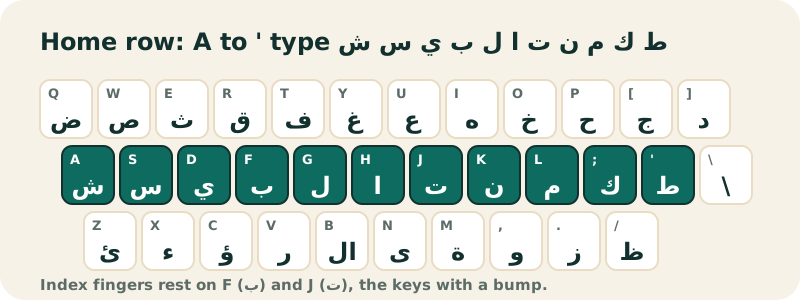
It is a rich row: alif, lam, mim, nun, ya, ta and ba appear constantly in Arabic. The article ال is H then G, and whole words such as كتاب (book), بنت (girl) and بيت (house) sit entirely on it. The F and J keys carry a small bump on most keyboards: left index on ب, right index on ت.
Where should your fingers go?
Exactly where they go for English. Each finger keeps its column whatever the language; only the letters change. If you already touch-type in QWERTY, your position habits carry over, and you only need to link each position to an Arabic letter.
| Finger | Left hand | Right hand |
|---|---|---|
| Index | ب (F) and ل (G) | ت (J) and ا (H) |
| Middle | ي (D) | ن (K) |
| Ring | س (S) | م (L) |
| Pinky | ش (A) | ك (;) and ط (') |
Letters that need attention
- لا (lam-alif) has its own key, B. Typing G then H gives the same result, and the test accepts both.
- ة (ta marbuta, M) and ى (alif maqsura, N) only come at the end of a word.
- Hamza has several keys: ء (X), ئ (Z), ؤ (C), and أ (Shift+H).
What plan should you follow to learn Arabic typing?
Regularity beats length: fifteen minutes a day does more than an hour once a week. The six lessons follow the usual touch-typing order, row by row from the home row.
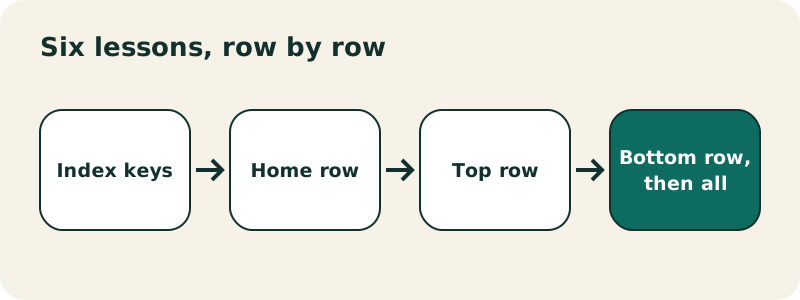
- Lesson 1: ب ل ا ت, the index-finger keys, until you can type them without looking.
- Lesson 2: the full home row.
- Lesson 3: the top row, reaching up and coming back.
- Lesson 4: top and home rows together.
- Lesson 5: the bottom row, with hamza seats, ta marbuta and alif maqsura.
- Lesson 6: every letter.
Move on when your accuracy stays above 95% over two or three tries. That threshold is not a standard, just a practical marker: a corrected error costs more time than a slow letter. Then take a 1-minute Words test every day; the tool keeps your best score for each length and level. If the letters themselves are still new, start with the Arabic alphabet.
What is a good Arabic typing speed?
There is no official benchmark. We found no public study that sets an average or "good" typing speed for Arabic, and we will not invent one. What exists is a measuring convention, explained by Wikipedia:
“Since words vary in length, for the purpose of measurement of text entry the definition of each "word" is often standardized to be five characters or keystrokes long in English, including spaces and punctuation.”
The convention was designed for English. We apply it to Arabic too, so your results stay comparable from one try to the next. Arabic words are often shorter on the page, because short vowels are not written, and some letters need Shift, so comparing your Arabic and English speeds says little. Compare yourself with yourself.
How to read your results
- WPM = correctly typed characters ÷ 5, per minute. Wrong characters do not count.
- Characters per minute = correct characters per minute, without dividing by 5.
- Accuracy = correct keystrokes ÷ all keystrokes. An error you fix with Backspace still counts.
- Keys to work on: the five expected letters where you made the most mistakes.
If your speed rises but accuracy drops under 90%, slow down.
Can you take the test on a phone or tablet?
Yes, but it is designed for a physical keyboard. On a phone, the tool shows a warning and lets you type with your phone's Arabic keyboard; finger placement no longer applies and predictive text can skew results, so only compare phone scores with phone scores. To add Arabic to your phone, see iPhone or Android. A tablet with a Bluetooth keyboard behaves like a computer.
Which exercises help between two tests?
- Copy one short real text a day in the Arabic keyboard: a recipe, a message, a shopping list.
- Repeat the lesson of a row where your "keys to work on" keep appearing.
- Add harakat once the letters are automatic, with the harakat keyboard.
- Install the Arabic layout on Windows to type in every app; the test recognizes it.
Frequently asked questions
Do I need an Arabic keyboard to take the test?
No. On a computer, your QWERTY or AZERTY keys are converted to the Arabic (101) layout by position.
How is WPM calculated?
Correct characters divided by 5, per minute. Wrong characters do not count.
What is a good Arabic typing speed?
There is no official standard. Track your own progress at the same length and level.
Does the test include harakat?
No. Texts are written without vowel marks, like most everyday Arabic.
Can I paste text into the test?
No. Pasting is blocked so the result measures your typing.
Is my score saved?
Your best score per length and level is kept in your browser's local storage, on your device only.
Which layout does the test use?
Arabic (101), the standard Windows layout, the same as our online keyboard.
Can I switch the key labels to AZERTY?
Yes. The Letters on keys buttons under the text switch between QWERTY and AZERTY labels.
Does it work on Mac?
Yes. Without an Arabic input source, your keys are converted by position. With one active, the test lets macOS type.
Related pages
Arabic keyboard — Free online Arabic keyboard: type Arabic with your QWERTY keyboard or by tapping the keys, then copy the text anywhere.
See also:
Sources
- Words per minute — Wikipedia
- Arabic keyboard — Wikipedia
- Windows keyboard layouts — Microsoft